Showing posts with label Cydia Tweak. Show all posts

FlipCam - Cydia Tweak To Quickly Change Front/Back Camera

FlipCam - Tweak To Change Cameras By Tap

For all people it might not be the app which does wonders.  But for someone who needs to change his front and rear camera too often; FlipCam is the app to download. This app just does one simple thing which is changing front and rear camera. Of course apple has given a switch over button in the right top corner of user interface to do the same thing. But with this tweak you can tap anywhere on your viewfinder to change the camera view.
FlipCam - Free Cydia Tweak

Some might appreciate this for saving time. But this cydia tweak has one real downside which may affect your photo taking experience. And this downside is non-functionality of focus-lock. As iPhone and iPads lock the focus when you tap the viewfinder; this tweak may disable this feature. Because you are tapping for changing the camera from front/rear; the focus lock thing might not work at all.

FlipCam is a free tweak which can be downloaded from BigBoss Repo. FlipCam works for 32bit as well as 64 bit devices. It is an open source project and you can view its source code here.

As we said earlier for someone not using the camera too often this might not be a charming app. But people who use cameras too often might certainly want to try it out. And the focus locking disturbance thing might not make this app so charming; but as it is free there is no harm in trying it out.


Have your say:

What are your views on this tweak? You can always interact and raise questions using the comment section.

How To Send Doodle Text on iPhone

Doodle Message to Send Doodle Text on iPhone

Do you want to send Doodle text to your friends via iPhone then this is the Cydia tweak you should have in your jailbroken iPhone. The name of this tweak is Doodle Message  and it allows you to send Doodle text to your friends using your iPhone messages only.

How To Send Doodle Text on iPhone by Doodle Message


This is a freeware from BigBoss repo and you can search for Doodle Message to have this fun and utility Cydia tweak. The best part of this tweak is; it allows you to use your gallery pics or you can also take pictures by camera. Then you can use Doodle brush to do effects on them. and if you want to use plain background you can simply use the message background. So; this tweak is useful when you want to point out something in the photo you just took by your iPhone camera. You can instantly make arrows or circles using Doodle Message and send this Doodle text to your friend.

Send Doodle Text on iPhone by Doodle Message

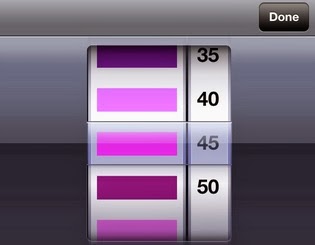
And you can select the brush size between 5 to 50 as well as change the color of the Doodle brush. There is a rotating selector in the tweak which allows you doing that easily. You can rotate the color bar to select the desired color and same thing can be done with your brush size.


So Start Sending The Text Doodles:

There is nothing much with this Cydia tweak for Doodle Text but certainly this is cool way to point your pictures or have some Doodle effect on those plain-looking birthday messages. So start sending the text Doodle way now.

Also See:

Please share the posts by selecting the Social media platform you use. The icons are displayed below and thank you in advance for sharing our posts.

Get iOS 7 Camera Effect with Cydia

Why iOS 7 Camera Is Good?

The best thing which was observed on iOS 7 camera was its continuous shooting mode. You might have come to know that iOS 7 camera allows you to have multiple picture when you hold the camera click. It will take pictures one by one and all the pictures will be saved to the camera roll. Now this becomes a really cool utility when you take pictures of sports actions or any other moving objects.

iOS 7 Camera Burst Mode


People have appreciated a lot of things on iOS 7 but they don't want to go for iOS update as this will compromise their jailbreak and  best Cydia apps and tweaks with that device. And thanks to Cydia developers they come up with great utilities which fulfill these generation gap between two iOS and you need not to update iOS for 1-2 features you want to have.

And you can also have this camera effect on your iOS like iOS 6 and all.  The name of this Cydia tweak is Burst Mode and best part of this tweak is it is better than the iOS 7 camera as well. The duration between two capture is less than what iOS 7 offers to you. Which means you can have more pictures per second with this Cydia tweak compared to normal iOS device.

And this Cydia tweak is free.!

Yes you can have that continuous shooting mode on your jailbroken device for free because Burst Mode tweak is absolutely free (as of 8/11/2013) on BigBoss repo. Search for it on your Cydia store and have the iOS 7 camera effect on your device too...!

Also See:


iPhone Live Wallpaper by Cydia Tweak

Do you want to have iPhone live wallpaper or video background iPhone which looks really great. Well this Cydia tweak is not new but it has not lost its charm either. The name of this iPhone live wallpaper tweak is Vwallpaper 2. It allows you to have video background on iPhone where you can either put the videos listed in the app and load your own videos. Which means you can set racing cars or burning flames as your iPhone wallpaper. Probably this is how your friend did it on his iPhone and you liked it :)

Vwallpaper: Cydia Tweak for iPhone Live Wallpaper

iPhone live wallpaper and video background iPhone


To have this cool tweak on your iPhone you need to add this source to your Cydia:  http://deb.danstaface.net. Go to Cydia dashboard and then manage. Tap the sources section and tap edit. Finally tap add and add the above url in there. Tap add source and that is it. The source is added to your iPhone now and the tweak is almost ready to use. Open the tweak in Cydia and install the corresponding version. After the source is added you can go to setting and open Vwallpaper 2 from there. All the iPhone live wallpaper setting are there. You can select the video background for iPhone from the pre-added videos and new version now also allow you to add your own videos. The live wallpaper will be present behind your app icons as well as on the lock screen. 

It was claimed earlier that this tweak a lot of iPhone resources which end up in reduced battery life and free memory. But it has been corrected to a great extent and you can have a look at it when you install this cool Cydia tweak. This has been possible now because the tweak is paused when you enter in other app or game.

Control Unlocker Cydia Tweak

Apple had its conventional swipe to unlock unlocking thing which forced you to unlock by the conventional way. And this is the reason people were lured by iOS 7 lock screen and they wanted to have iOS 7 lock screen on iOS 6 and other iOS. But if you are talking about Cydia world; it really came out with a lot of tweaks to unlock your iPhone. This article talks about one more cool way to unlock your iPhone by a Cydia tweak called as control unlocker.

control unlocker cydia tweak

So how does Control Unlocker work:

This Cydia tweak shows a four direction pad and two red color buttons on your device; when you are on the unlocking interface. You can decide in the app settings area how you want to unlocking activated. For instance you can set sequence of buttons like ABAB, BAAB, AAAB or like wise. Alternatively you can also choose the arrow button on the control pad. And if you are believer of hard passcodes you can also mix buttons with the arrow thing. Basically this tweak does not add extra layer of security; it is just replacement of your conventional swipe to unlock thing. But this tweak certainly looks something different when you open the lock.

What else apart from unlocking:

And you can also set your custom message on the unlock screen with this Cydia tweak. I have added TEXT AREA in the above image to show where this message will be appearing. (though it is in white fonts here; on app it is available in red fonts).
Control unlocker is a free Cydia app from BigBoss repo. That will be pretty much of it about Control Unlocker tweak. For all other old and new tweak and apps please keep on visiting CydiaMasters.

Also See: Cydia Tweak to Download Vine Videos
                Cydia Tweak to Find Unknown Callers

Cydia Tweak For Vine Videos : VineDownloader

Vine is the next big thing after text social networks and YouTube. And it has gathered a lot of attention and popularity in a short span of time. Short videos of 6 seconds on Vine have been able to make to the charts and people have appreciated them well. So it's the time to get a Cydia tweak for Vine videos. And this tweak is called as VineDownloader. Just like YouTubeDownloader for YouTube videos; you can get the Vine videos on your iPhone or iPad using this Cydia tweak.

Cydia Tweak For Vine Videos


Why Do We Need A Cydia Tweak For Vine Videos?

The issue with the conventional and default Apple setting is; it does not allow you to save the videos to your camera roll from the Vine for iPhone itself. So there was definitely need of some tool which would easily allow doing this.

So to use this cool Cydia tweak you have to be jailbroken and Vine for iPhone should have been installed on your iPhone. This Cydia tweak for Vine videos costs just 0.99$ and it is available from BigBoss repo. It can also be used for iPad.
One this tweak is installed on your device make sure Vine is enabled in your privacy setting or else this tweak might not work.


How To Download Vine Videos?

After the VineDownloader installation is finished and Vine is enabled in your privacy setting; open Vine for iPhone. Play any video which you want to download on your iPhone. Pause the video before 6 seconds and three small dots will be there just below the video screen. Tap on them and you will have an option of saving that video. Once the save command is given; this video will be downloaded to your camera roll. It is very fast in downloading the videos; possibly because the video size is too small. 


If you are a big fan of Vine videos and always wanted to download Vine videos on your iDevice; VineDownloader Cydia tweak for Vine videos must be on your jailbroken device. 

Top 6 Cydia Apps For iPad

Cydia Apps for iPhone Rules The Market:

Once the Cydia came into the picture majority of people have been customizing and personalizing iPhone  and iPad. Most of these apps and tweaks are coming from the Cydia sources which focus mainly on iPhone. Most of the apps are opened on iPad too but some of them might not be compatible with these bigger Apple devices. In this article we are trying to give top Cydia apps for iPad; which are deigned keeping in mind iPad only.

Top Apps For iPad:

Cydia apps for iPad


So let's see what are these apps which are designed for customization and best utilization of the iPad.

1) SplitMail: 

This is a freeware from BigBoss repo and it works to split the view in halves when you are using mail application. This is possible in portrait as well as landscape mode. This makes the handling of mail application much more faster and easier.

2) Zephyr:

Zephyr is also useful Cydia tweak for broken home button on iPhone. It is used for iPhone as well as iPad. This is in fact gesture based control system for iPad where in you don't have to worry about the physical button on your iPad anymore. This iPad app also helps you a lot for task-killing and app switching. It is available from BigBoss repo for 4.99$ (Looking at the current iOS update I strongly feel these prices will definitely slash. This is because some of the Zephyr features are already built-in with iOS 7).

3)FullForce:

Perfect for game playing on iPad; this Cydia tweak forces the app screen to fit the iPad screen. This is very handy when you use a lot of apps and games which are designed only for iPhones and black bars appear sometimes on the edges; when the app is open. You can select the app where you want to use FullForce to fit them to your iPad screen (make sure that app is closed when you do this selection). Again this is a free app from BigBoss repo. This has always been on the list of best Cydia apps for iPad.

4) NCPad:

This tweak stretches all the notifications on the iPad; and hence top horizontal looks filled in. This is a freeware from ModiMyi repo.

5) SwipeSelection:

Are you a typist on iPad; who spends a lot of time typing on the iPad; then this is just for you. Because as you type a lot; you need to edit, copy paste and cancel a lot too. SwipeSelection makes it easy by as you will do same things by gestures. This is a freeware from BigBoss repo.

6) WeKillBackgroundPro:

Tired of killing your apps one by one on your iPad. Then it is the time to get this cool Cydia tweak for your iPad (it is available for iPhone too). Once this tweak is installed you can kill all your backgrounds apps by click of a single button in your notifications area. Again this is from BigBoss repo.

Hope you guys liked the 6 top Cydia apps for iPad. You can always have 1-2 other apps in your mind which should be here. And in some cases you might put entirely different apps as per your need. This list is made based upon the popularity and number of downloads of these apps. You can put your app in comment area and we can always insert them in our list of top Cydia apps for iPad.

iBlacklist - Tool To Block iPhone Calls and Much More

Until I started using this app myself I though iBlacklist was just to block iPhone calls and may be one or two more features. But there are plenty of things under one hood of this great Cydia app. (When Apple will allow such apps on the AppStore).

Great tool to block iPhone calls:

Just like all other Cydia apps and tweak iBlacklist only works on jail-broken devices. And be aware of so many duplicate apps available on Cydia market under the same name. This is the link for the original developer Spektro and they have some resellers too; which are listed on the same website.
You can also get it from Cydia store and get the activation key to register your device.
iBlacklist is the best tool to block annoying and unwanted calls to you. You can create different lists which are called as Blacklists. These blacklists can then be assigned a different action when a call is received from these numbers. There are four different actions you can take on them which could be transfer to the voicemail or straight rejection itself. And as far as the number feeding is concerned you can pull the numbers from call history, phonebook or even manually feed them.

iBlacklist - Tool To Block iPhone Calls


Another benefit with iBlacklist app is you can set a particular time for the blacklists and you can have different blacklists for different action. So it is few steps ahead then conventional call blocking system. And just like blacklists iBlacklist also allows you to make whitelists too. The whitelist entry are those people whom you want to contact you and no one else.

What else does iBlacklist has to offer:

iBlacklist has prime goal to block iPhone calls but it is not limited to only this functionality. Apart from blocking calls on your iPhone it can also do the following:
- iBlacklist allows you to block Facetime and SMS from the blacklists. Once again the intensity of blocking will be as per your setup for the particular blacklist.
- It can send a customized message for failed calls to blocked callers.
- By silent record storage parental control is also promoted through this app.
- It can customize the way you receive the notification for message. For instance some messages you don't like to be seen as pop-up.
- It records the blocked and filtered calls so you can visualize them later. Your setup needs to be proper for this. 
- It can send auto SMS reply for the blocked SMS.
- It allows you to fully configure statubar icons, sounds and vibration for the notifications.

In a nutshell, iBlacklist is not just a tool to block iPhone calls but it has a lot more to offer for your privacy. Get this tool now for complete piece od mind from telemarketing callers and people calling you at wrong times....!

Also See:

Get Full iPhone Customization With Springtomize 2

Single App For Full iPhone Customization:

No doubt iPhone are phones out of this world and people just love to use them. And this is the reason Apple only makes iPhone and nothing else in phones and gathers huge loads of bucks in every iPhone launch. But as these phones are not allowing full access and controls for personalization and customization people tend to jailbreak it. iPhone customization via different Cydia apps and Cydia tweaks is possible. And so many tweaks are available in the Cydia market now to do these iPhone customization. How good would it be if a single Cydia app is capable of doing so many iPhone personalizations for you. The name of the tweak is Springtomize 2. This is packed with a lot of stuff to change the looks and functionality of your iPhone.

Full iPhone Customization


Springtomize 2 alters the look and functionality of your dock, animations, capabilities, lock screens, folders and the way you do app switching.

Source and Functions of this Cydia Tweak:

This cool Cydia tweak is bunch of capabilities and can be obtained from BigBoss repo. You can search Springtomize 2 in your Cydia store to find this app. It costs 2.99$ and the disk size is less than 500KB. Looking at all the iPhone customization this app does; the price is more than justified.

Once this app is installed you can carry out below functions:

1) Dock: 

You can do a lot of effects on iPhone dock including hiding the dock, remove the reflection or add the cover flow effect. 

2) Capabilities:

You don't find a particular functionality not that appealing on your iPhone. In Springtomize 2 you can select to deactivate them at all. There are few features available here including the Voice control and multi-tasking.

3) Animations:

You can customize each animation by duration, color, sound and direction parameters. One example is: you can make old-fashioned tube TV switch off effect on your iPhone switch off animation and not the usual circulating bars.

4) Lock Screen:

Want to disable lock screen or need to change same SLIDE TO UNLOCK text with your name. This menu allows you these and some other lock screen functionalities. (Wish it gave AndroidLock effect too).

5) Icons: 

A lot of iPhone customization can be carried out in Icons menu of the Springtomize 2. You can change the size and label of your home screen icons. Also it allows you to change icons per line. You can also disable the move and app uninstall function too.

6) Folders:

You can change the looks and contents of the folder by Springtomize 2. You can disable the preview box, hide the labels and choose how many icons will display in each line in your folder window.

All these and many more things are there to grab in Springtomize 2 for full iPhone customization. Get it now and start changing the look and functionality of your iPhone devices....!

How To Record Calls On iPhone

It has been waited for long and people just wanted to have call recording feature on their iPhone. It was asked on almost all iPhone forum and most of the technology forum, "How To Record Calls on iPhone?"

Apple never let any app enter in the App Store which will allow the users to do this on non jail-broken devices. And looking at the different regulation in different countries this move was more than welcome. But everyone does not use call recording for bad purposes; there are some nice intentions behind them as well. And for those people who are asking with nice intention there is a Cydia app which can allow you call recording on iPhone 5 and iPhone 4S. The older iPhone versions won't support this Cydia tweak. And iPhone 4S needs to be put on speaker mode to record the calls :(

how to record calls on iPhone devices

So, how to record calls on iPhone by this tweak?

This iPhone tweak is developed by Elias Limneos; which is priced at 3.99$. You can follow the following steps to get this tweak on your device (only jail-broken iPhone 4S and iPhone 5 please).

- Tap Cydia store on your iPhone.
- Tap on Manage and then open sources. 
- Select edit and tap on add source.
- Type in this source in the url area: http://limneos.net/repo
- Add it on our iPhone.
- Now search for Call recorder in Cydia or just open the Limneos repo just added to your Cydia store.

How To Record Calls On iPhone

The call receiver gets a voice alert that the call is being recorded when you use this tweak. You have choice of enabling or disabling the beep sound though. The voice alert is designed keeping in mind legislation in some countries where both the parties should be aware about call recording. 
Still the beauty of this call recording Cydia tweak is not lessened. Please use it for fair usage only. I hope this answers how to record calls on iPhone. See you again with one more Cydia tweak or app.

Change Your In-Call Voice By VoiceChanger Tweak

Prank Your Friends By VoiceChanger Tweak

VoiceChanger tweak allows you to change your in-call voice live on your iPhone (iPhone 4S* and newer version). This cool Cydia trick let's you change your voice in the call to Smurf, Dark lord or even Rumpelstiltskin. The best feature of this cool tweak is that it changes your voice whilst you are on call (sounds good isn't it). You can alter between desired voice alteration or normal voice within the call too. It can be done by pressing home button whilst on call. And go to settings and switch off the tweak or change the effect.
So VoiceChanger tweak can be a great tool to make a prank on your friends. How about Rumpelstiltskin wishing your son happy birthday....!

Change Your In-Call Voice By VoiceChanger Tweak

These are the five effects on VoiceChanger tweak: Dark Lord, Tenoro, Smurf and Rumpelstiltskin. Well they say Normal-No Effect as fifth effect; but that is your default voice on call. So let's say it let's you choose from 4 effects or the default voice.
The only downside of this application so far is that; it does not work on iPhone 4, iPhone 3GS and iPhone 3. And if you want the trick to work in iPhone 4S you need to switch the call on the speaker mode. As such the tweak is reported to work perfectly on iPhone 5. You can configure the app setting via the setting menu.
The cost for this tweak is 2.99$, but looking at the in-call voice changing ability that much price is more than justified. 

Where You Get This Tweak From:

This tweak is available on BigBoss repo. You can search for "VoiceChanger" in the search box. You should install the tweak whose author is Elias Limneos. 
It is very easy to use and easy to set up as well. So start making pranks on your friends now.

iBook Tweak for Trichotillomania


What is Trichotillomania?

Before we go further to discuss this Cydia tweak for iBook, for Trichotillomania patients; let us see what this condition is. Trichotillomania is an impulsive control disorder in which the patients suffer from hair loss due to involuntary urges to twist the hairs; or to pull them off. As such patients have no control on this behavior and the hair loss gradually goes on increasing day by day.

This habit worsens when the patient is involved in activities where his hands are free or comparatively free; which is obvious too.
iBook Tweak for Trichotillomania

So how does Cydia tweak helps in Trichotillomania?

Well it does not stop patients playing with the hairs. But as this hair twisting and pulling activity is high while reading; it does something which stops this behavior by passive means. This Cydia tweak makes the person use two hands while they are reading on iBook app at all times. Thus the hand is not free for hair pulling and twisting. Simple way to keep the hands busy and save some hairs.
The app is called as iBook - Two hands and it is available for free (requires iOS 5.x or more). You can search for iBooks - Two Hands to get it on your jail-broken iPhone. It is available as freeware from BigBoss repo; author of this app is Shmoopi.
As said earlier; this tweak is focused for Trichotillomania affected people. Unless you have habit of reading with two hands in iBook; this app might not be useful for you.
The app setting panel can be used to switch on or off the tweak. This is really great idea to save some hair for Trichotillomania patients.
Do you fins this Cydia tweak for iBooks appealing enough? Have your valuable suggestions on this in the comments area now...!

Set Different Volume for Different iPhone Apps By Volume Tweak

Different Volume For Different Apps on iPhone

It's annoying when your alarm is not beeping loud enough; because you set the volume low for the game you played before sleeping. Won't it be great if you could set different volume setting for different apps. Which means your alarm clock is always knocking off at the full throttle and your games are just on 2-3 bars;may be more if you are a game maniac :)
Well this is not possible on default Apple setting but it is surely possible when it comes to Cydia. There is a Cydia tweak which allows you to set different volume for different iPhone apps. It is called as Volume tweak and it is free to download and use.
different volume for different iPhone apps

Source for the tweak:

This Cydia tweak is available in BigBoss repo and you can search it by typing in "Volume" in the search box in Cydia dashboard. It might be bit confusing for you as so many things might pop up for this search keyword. So, select the one whose author is NYDevs.

How Does it Work:

Once this tweak is installed it is really simple job after that. You can open any application you wish to and set the volume level desired for you. This app will remember this level and when you open the same app again it will automatically set the volume to that level only. You can configure options for this app in the setting menu for this app. This becomes really handy if you are using a variety of apps on your iPhone or iPad; as you can keep customized sound level for each on of them.

So, now you know how to set different volume for different iPhone app using Cydia tweak. Let us know your experience after using this tweak in the comments box. 

Waveoff CydiaTweak - Show Your iPhone is Under Your Commands

Waveoff - Palm Powered Screen On/Off

If you read the tales of the Arabian Knights; you must have come across the story of the door which opened with the command. Now here in Waveoff Cydia tweak you need to command anything by your mouth. Instead you can just swipe your hand in front of your iPhone screen. And by doing so you will be able to turn your screen on/ off. It will be toggle action; so if the screen is off when you swipe it will turn on and vice versa. It works on the principle of motion sensors which are present near the front camera of your iPhone. So every time these sensors sense a movement they release the command for either switching on or switching off the scree.
As such Waveoff tweak does not add much value to your iPhone or iPad (Frank review isn't it?); but it is a very good show off app. You can impress other users who don't an iPhone or who own a non jali-broken iPhone.
Waveoff Cydia tweak is available on BigBoss repo for 0.99$.
Waveoff Cydia Tweak
The swipe control will only work when phone is not in locked mode. This is because the motion sensors are disabled when the iPhone is in locked mode. Try to keep your palm near the proximity of the iPhone of about 1-2 inches. If you go farther than that; the tweak might not work or seems to work slowly. Also the tweak works nicely if your hand is closer to the front iPhone camera; as the sensors are present there.
As we said; not adding much value to the iPhone, but Waveoff Cydia tweak certainly looks good when it comes to show-off. So start showing people; that your iPhone is under your palm's command. 

Here Is How This Tweak Works:


Best Cydia Apps and Tweaks - All Time

Best Cydia Apps And Tweaks for iPhone (or iPads)

Second most haunting question an iPhone user have is what are the best apps for him. Of course the first question remains the same; shall I jailbreak my iPhone or not? And once you are jail-broken you always want to know what are the best Cydia apps and tweaks which can help and entertain you throughout the course. And to ease out that second question about jail-broken iPhones we are giving you a list of best Cydia apps and tweaks which people have liked for so long and they use it with pleasure.
Best Cydia Apps and Tweaks

10) Airblue Sharing:

People loved it when this cool pairing Cydia app was launched and they appreciated it after continued use. AirBlue sharing took the trauma of not being able to pair iPhone with other iPhone as well as iPhone to other devices. This app never lost it charm and has been successfully helping out people to connect. AirBlue sharing provided what a Bluetooth pairing provides(connection, file transfer, Wi-Fi sharing and all); but at much higher speeds.

9) Zephyr:

Zephyr really came as rescue to get solution for broken iPhone home button. People could get this Cydia tweak and they did not have to use iPhone home button ever again; if it was broken. And that was not the only utility for this cool app. It gave freedom from boring Apple app switcher and multitasking area. Just like AirBlue this app was also well appreciated and it remained high rated from the time it came out. And it remains the cheapest solution for broken iPhone home button outside Apple. (Apple have AssisitveTouch which is free option for broken home button)

8) 3G Unrestrictor:

I really hated when iPhone flashed a message that I can not perform this action on mobile data and I need to be on Wi-Fi to do it. Just like Face-time or downloading a comparatively large-sized app. Well this utility which has to get place on best Cydia apps and Tweaks; does it all for you. You can call someone over Face-time or download those large file. In a nutshell. it let's you do things over 3G, which are otherwise not allowed.

7) iFile:

This cool app took away the trauma of not being able to access the root files of iPhone. It allows users to edit, alter the permissions, rename and change the root files of your iDevice. Some people complained of this app being too complicated and wiped away the data on their device. This is probably because those guys did not know the iOS filing system and used this app without proper caution.
Looking at the great benefit offered by this cool jail-broken app it has to be included in best Cydia apps and tweaks of all time.

6) iBlacklist:

Don't want your boss to call you when you are on vacation and at the same time you want to keep the number open for your mom? Well iBlacklist gave you that freedom on iPhone. It allows you to block specific numbers from calling you. You can also block all unknown numbers from calling you. So, don't worry about your EX calling you for patch up when you are with new partner :)

5) Springtomize:

Best Cydia Apps and Tweaks

Well, how could this be kept out of the list of best Cydia apps and tweaks. This is not a single app, rather a bunch of app which allows you to customize so many things. It allows you to change carrier logo text, home, LockScreen, icons, folders, app switcher and all.

4) Infifolder:

Apple came out with folder thing for icons and they allow you to make folders and put app icons in them. But there was a certain capping on how many icons could fit in one folder. Infifolder removes this capping and you can put as many icons as you wish in one folder.
What more could you ask for? It also allows you to make sub-folders in the folders and you can do some customizations as well.

3) Activator:

I would rather call this as mathematician's application. It allows you to set a function associated with a trigger action. Like if you can set a specific app to open with double tap of the home button. It is really useful as you don't need to scroll or tap more for your personalized repetitive actions.

2) vShare:

For most of us vShare is number one among best Cydia apps and tweaks. This cool app allows you to download paid apps and games for free on your iPhone and iPad. So you don't need to worry how much a specific application costs as long as its crack is available on vShare. Moreover, user interface is very easy and user-friendly on this app. 

1) Winterboard:

Winterboard was first of its kind app which allows users to change the look of their device the way they wanted it to be. It comes packed with lot of tweak and themes which can change your iPhone look every hour if you want to.

These best Cydia apps and tweaks were not numbered according to priority. So, for someone vShare could be number 1 and for someone it might not be in top 10. But all these apps have been appreciated highly by global users. Let us know if you wanted to see some app in this best Cydia apps and tweaks list.

Find Unknown Caller By Cydia Trick

It's so annoying when you get an unknown number calling flash on your mobile screen. For me it is kind of alarm; which says me DON'T PICK IT. Personally I hate people calling by hiding their number for two reasons. First is why should you hide your number when you call me and second is I can't get back to them when I miss the call. So what could I do with them? Well I figured it out how to go about it on my jailbroken iPhone. There is a Cydia trick for this which allows me to see the Unknown number's number if it is on the database. This cool Cydia trick is WhozCalling Cydia tweak.

Find Unknown Caller By Cydia Trick


As of now there are 2-3 applications for non jailbroken phones as well like TrueCaller and all. But I really liked the WhozCaling as this Cydia trick is almost instant and I can see the number almost when the call is coming on my device.

So How This Cydia Trick Works?

The working pattern is more or less similar for this type of application. They have a large database of number and they match it with the database. So whoever has got the bigger database of numbers; comes out as a better application. As far as WhozCalling tweak is concerned; I get it almost in 75% plus cases. So it should be considered as to be a better unknown number tracking application as the success ratio is high.

How To Get This Cydia App

- Simply open your Cydia and seacrh for WhozCalling in it. 
- Install the application and apply necessary setting if you want to configure it.
- The BigBoss repo provides this Cydia trick for unknown number tracking for free.

So get it now and know who call you with unknown numbers. Let us know in comment whether you found this Cydia tweak nice enough or not..!